先给结论
findstr /i /n "error" app.log
findstr /c:"request timeout" app.log
find /c "ERROR" app.log
findstr /c:"超时" cn-gbk.log
- 几十万行的日志不用打开:
findstr逐行扫,14.9 MB、30 万行,只输出命中的那 300 行。 find只做子串匹配,但自带/c计数,还能读 UTF-16 文件;findstr有正则、/g关键词表、/m只列文件名,大文件上的速度差一个数量级。find会在结果前打一行---------- 文件名,findstr单个文件不打。行号格式也不同:find /n是[3],findstr /n是3:。findstr的/c:"..."是"整串短语",不是计数。空格分隔的多个词是"任一命中"。要计数得接find /c /v ""。findstr默认按正则解释,/l才是纯文本;正则只支持. * ^ $ [] [^],+ ? | () {}都不认。- 带空格的正则必须用
/c包住,否则空格会把表达式拆成几个"或"条件。 type 日志 | findstr ...和findstr ... 日志结果一样,差别在速度;find走管道时不打文件名标题。chcp 65001只改变find的解释方式,findstr的搜索词固定按系统 ANSI 代码页转码,UTF-8 中文照样搜不到。
日志排查的第一步不是打开文件,是
find /c数一下:这类报错到底出现过几次。
演示用的日志
全部在 E:\cmd-demo\log 里,路径就是本机真实路径。同目录的 setup.ps1 会重建下面这些文件,每段示例都从重建后的状态开始;测试文件保留。
| 文件 | 内容 |
|---|---|
app.log |
300000 行、14931750 字节;每 1000 行一条 ERROR,每 7 行一条 request timeout |
sample.log |
9 行小样本,ERROR 3 行、timeout 4 行 |
keywords.txt |
两行:ERROR、timeout |
cn-utf8.log |
10 行中文,UTF-8 无 BOM,超时 3 行 |
cn-gbk.log |
同样 10 行,GBK 编码 |
cn-utf16.log |
同样 10 行,UTF-16 LE 带 BOM |
一、find 和 findstr 差在哪
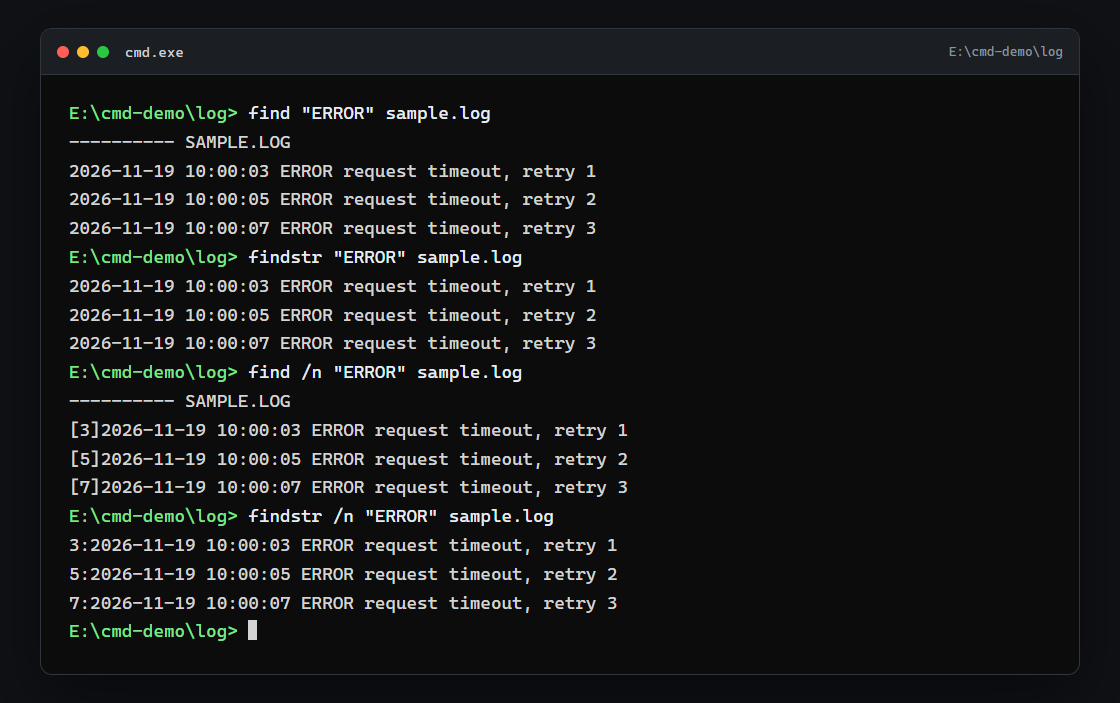
同一条命令,先看输出:
find "ERROR" sample.log
输出:
---------- SAMPLE.LOG
2026-11-19 10:00:03 ERROR request timeout, retry 1
2026-11-19 10:00:05 ERROR request timeout, retry 2
2026-11-19 10:00:07 ERROR request timeout, retry 3
findstr "ERROR" sample.log
输出:
2026-11-19 10:00:03 ERROR request timeout, retry 1
2026-11-19 10:00:05 ERROR request timeout, retry 2
2026-11-19 10:00:07 ERROR request timeout, retry 3
三条内容一样,差别在 find 多了一行 ---------- SAMPLE.LOG,而且文件名被转成大写了。两个命令都有匹配时返回 0,没匹配返回 1。
行号格式也不一样:
find /n "ERROR" sample.log
findstr /n "ERROR" sample.log
输出:
---------- SAMPLE.LOG
[3]2026-11-19 10:00:03 ERROR request timeout, retry 1
[5]2026-11-19 10:00:05 ERROR request timeout, retry 2
[7]2026-11-19 10:00:07 ERROR request timeout, retry 3
3:2026-11-19 10:00:03 ERROR request timeout, retry 1
5:2026-11-19 10:00:05 ERROR request timeout, retry 2
7:2026-11-19 10:00:07 ERROR request timeout, retry 3
什么时候必须用 findstr:要正则、要一次给多个关键词、要用 /g 从文件读关键词、要 /m 只列文件名。这些 find 都没有。
什么时候 find 更省事:只想要一个数字。find /c 直接给计数,findstr 没有计数参数,只能再接一条 find /c /v ""。另外 find 能读 UTF-16 日志,findstr 遇到就报警,这一点在第七节展开。
多个文件时格式也不同。findstr 给每行加 文件名: 前缀,find 是按文件分块,每块先打一行标题:
find "ERROR" sample.log keywords.txt
输出:
---------- SAMPLE.LOG
2026-11-19 10:00:03 ERROR request timeout, retry 1
2026-11-19 10:00:05 ERROR request timeout, retry 2
2026-11-19 10:00:07 ERROR request timeout, retry 3

---------- KEYWORDS.TXT
ERROR
脚本里要区分来源,findstr 的前缀更好切;find 的标题更像给人看的。
二、find 的四个开关:/i、/n、/v、/c
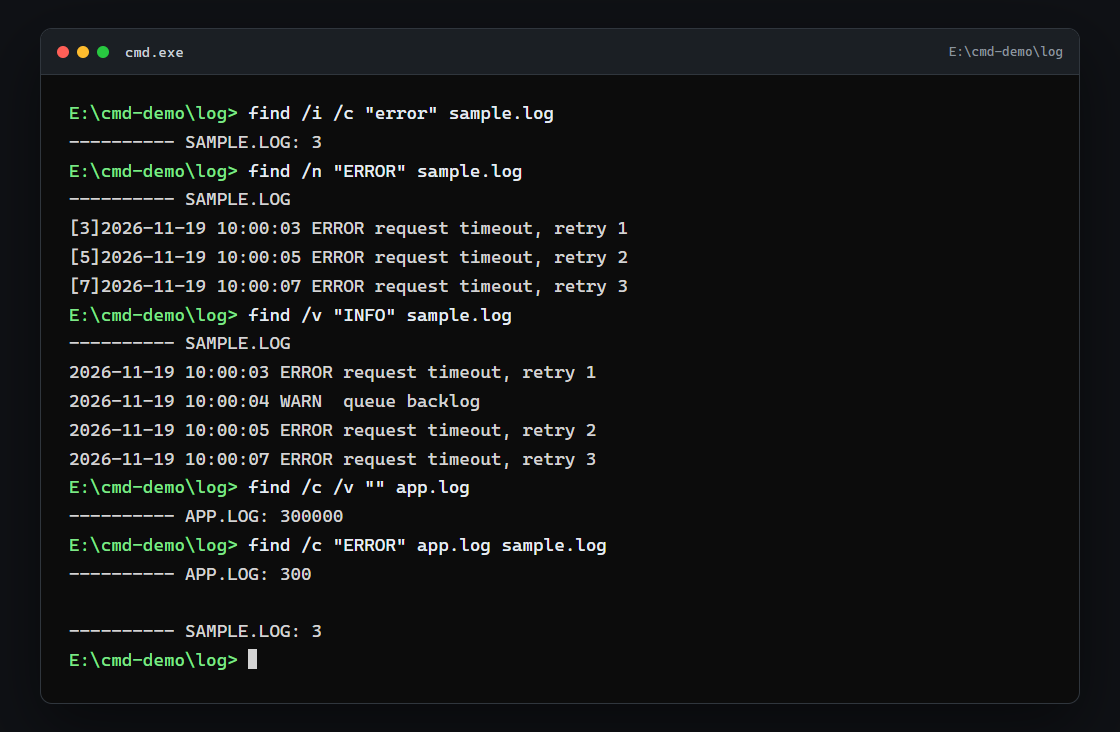
/i 忽略大小写,关键词写小写也能命中:
find /i /c "error" sample.log
输出:
---------- SAMPLE.LOG: 3
/n 带行号,格式是 [行号],紧贴正文:
find /n "ERROR" sample.log
输出:
---------- SAMPLE.LOG
[3]2026-11-19 10:00:03 ERROR request timeout, retry 1
[5]2026-11-19 10:00:05 ERROR request timeout, retry 2
[7]2026-11-19 10:00:07 ERROR request timeout, retry 3
/v 反过来,输出不含关键词的行:
find /v "INFO" sample.log
输出:
---------- SAMPLE.LOG
2026-11-19 10:00:03 ERROR request timeout, retry 1
2026-11-19 10:00:04 WARN  queue backlog
2026-11-19 10:00:05 ERROR request timeout, retry 2
2026-11-19 10:00:07 ERROR request timeout, retry 3
/c 只出数字。想数总行数,用空字符串配 /v,/v "" 等于"不含空串的行",也就是全部行:
find /c /v "" app.log
输出:
---------- APP.LOG: 300000
find /c 可以一次给多个文件,每个文件一行结果:
find /c "ERROR" app.log sample.log
输出:
---------- APP.LOG: 300
---------- SAMPLE.LOG: 3
三、findstr 的 /c 和空格:一个短语,还是几个词
findstr 的 /i、/n、/v 和 find 意思一样,只是行号是 3: 这种格式。真正容易踩的是多个关键词:
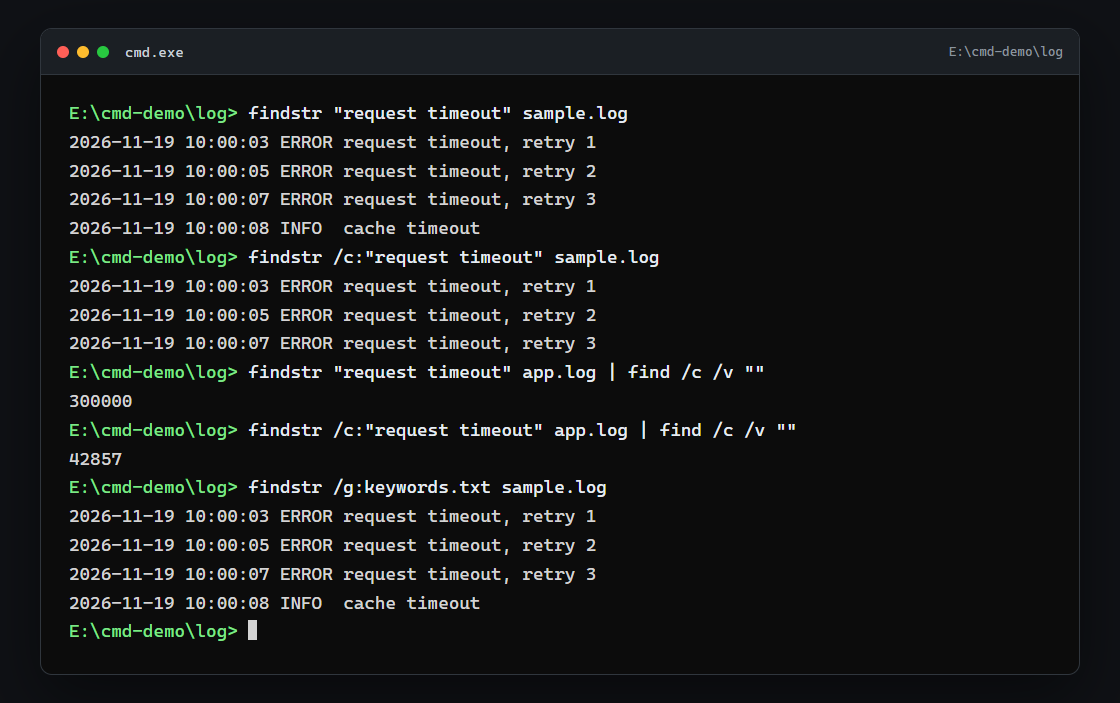
findstr "request timeout" sample.log
输出:
2026-11-19 10:00:03 ERROR request timeout, retry 1
2026-11-19 10:00:05 ERROR request timeout, retry 2
2026-11-19 10:00:07 ERROR request timeout, retry 3
2026-11-19 10:00:08 INFO  cache timeout
空格分隔的两个词,是"含 request 或 含 timeout",所以第 8 行只有 timeout 也被选中,共 4 行。想搜完整的短语,用 /c:
findstr /c:"request timeout" sample.log
输出:
2026-11-19 10:00:03 ERROR request timeout, retry 1
2026-11-19 10:00:05 ERROR request timeout, retry 2
2026-11-19 10:00:07 ERROR request timeout, retry 3
现在只剩 3 行。/c 的意思是"把整个引号里的内容当成一个搜索串",空格不再拆词。
在大文件上,这个差别是数量级的。app.log 里每一行都含 request:
findstr "request timeout" app.log | find /c /v ""
输出:
300000
findstr /c:"request timeout" app.log | find /c /v ""
输出:
42857
不知道关键词怎么写,可以把它们放进文件,一行一个,再用 /g:
findstr /g:keywords.txt sample.log
输出:
2026-11-19 10:00:03 ERROR request timeout, retry 1
2026-11-19 10:00:05 ERROR request timeout, retry 2
2026-11-19 10:00:07 ERROR request timeout, retry 3
2026-11-19 10:00:08 INFO  cache timeout
/g 等价于把这些词用空格连起来,也是"任一命中"。
四、正则:默认就开着,但只认得一小半
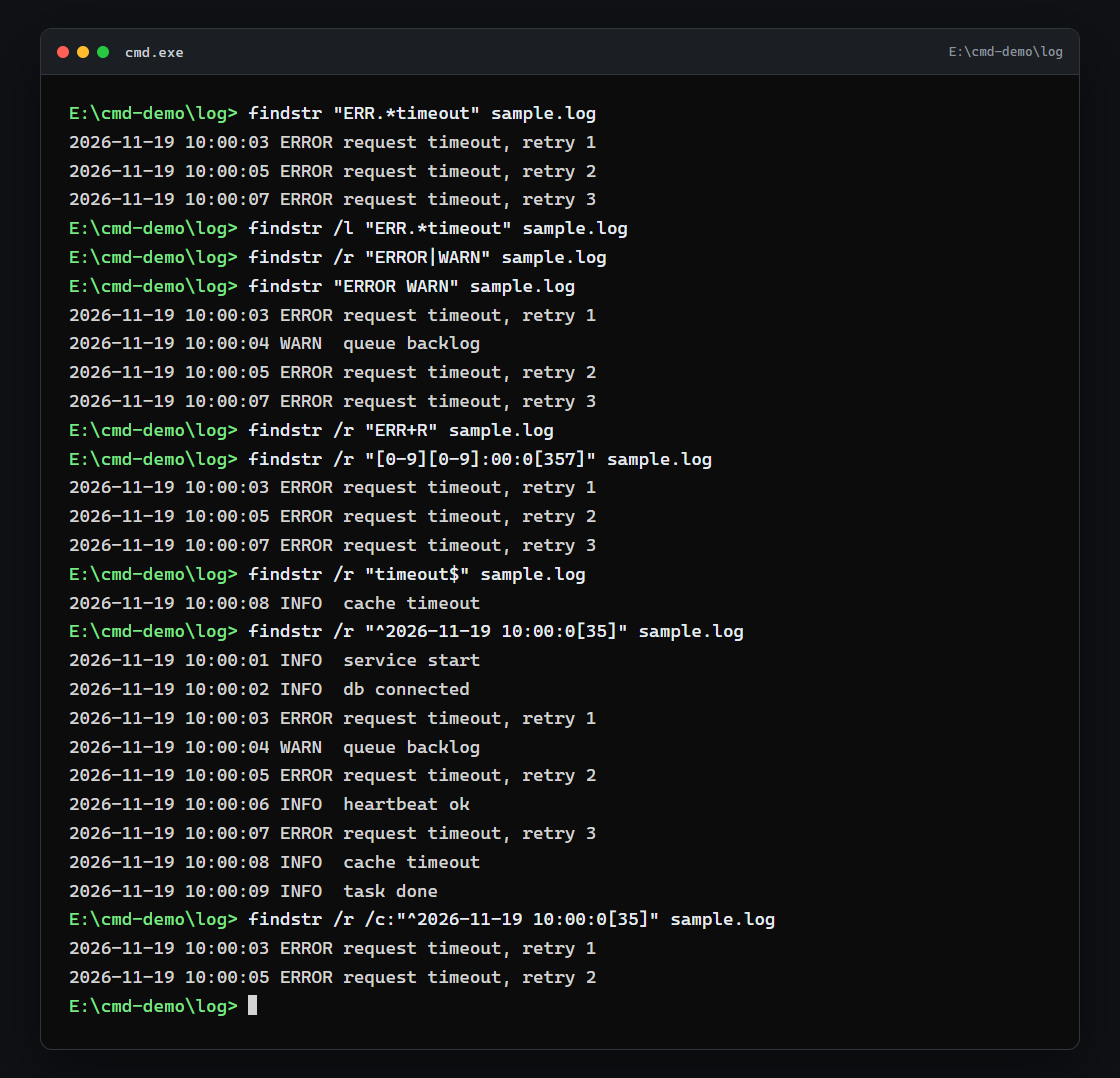
很多人说 findstr 默认是纯文本、要加 /r 才按正则。实测不是:下面这条不带 /r:
findstr "ERR.*timeout" sample.log
输出:
2026-11-19 10:00:03 ERROR request timeout, retry 1
2026-11-19 10:00:05 ERROR request timeout, retry 2
2026-11-19 10:00:07 ERROR request timeout, retry 3
.* 被当成通配符执行了。加上 /l 才是纯文本:
findstr /l "ERR.*timeout" sample.log
没有任何输出,退出码 1。所以 findstr 的默认行为就是正则,/r 只是把这件事写明;/l 用来关掉它。
它只支持 .、*、^、$、[]、[^] 这几种,+、?、|、()、{} 都不认。常用写法里最容易失效的就是竖线:
findstr /r "ERROR|WARN" sample.log
没有输出,退出码 1。| 不是"或",会被当成普通字符,整串 ERROR|WARN 在文件里找不到。要"或",还是回到空格:
findstr "ERROR WARN" sample.log
输出:
2026-11-19 10:00:03 ERROR request timeout, retry 1
2026-11-19 10:00:04 WARN  queue backlog
2026-11-19 10:00:05 ERROR request timeout, retry 2
2026-11-19 10:00:07 ERROR request timeout, retry 3
+ 同样不认:
findstr /r "ERR+R" sample.log
没有输出,退出码 1。
字符类和锚点可以用:
findstr /r "[0-9][0-9]:00:0[357]" sample.log
输出:
2026-11-19 10:00:03 ERROR request timeout, retry 1
2026-11-19 10:00:05 ERROR request timeout, retry 2
2026-11-19 10:00:07 ERROR request timeout, retry 3
findstr /r "timeout$" sample.log
输出:
2026-11-19 10:00:08 INFO cache timeout
带空格的正则还是个坑。下面这条想匹配时间戳开头,结果把整份文件都打了出来:
findstr /r "^2026-11-19 10:00:0[35]" sample.log
输出:
2026-11-19 10:00:01 INFO  service start
2026-11-19 10:00:02 INFO  db connected
2026-11-19 10:00:03 ERROR request timeout, retry 1
2026-11-19 10:00:04 WARN  queue backlog
2026-11-19 10:00:05 ERROR request timeout, retry 2
2026-11-19 10:00:06 INFO  heartbeat ok
2026-11-19 10:00:07 ERROR request timeout, retry 3
2026-11-19 10:00:08 INFO  cache timeout
2026-11-19 10:00:09 INFO  task done
因为空格把表达式拆成了 ^2026-11-19 和 10:00:0[35] 两个条件,每行都以 2026-11-19 开头,于是全部命中。用 /c 包住才是一个整体:
findstr /r /c:"^2026-11-19 10:00:0[35]" sample.log
输出:
2026-11-19 10:00:03 ERROR request timeout, retry 1
2026-11-19 10:00:05 ERROR request timeout, retry 2
五、30 万行实测:谁快,输出多大
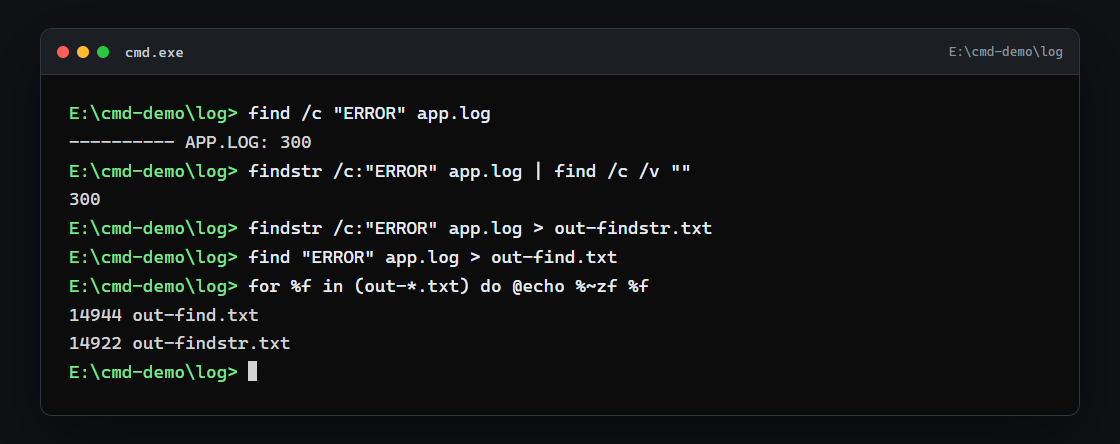
先数命中行:
find /c "ERROR" app.log
输出:
---------- APP.LOG: 300
findstr /c:"ERROR" app.log | find /c /v ""
输出:
300
再把结果写进文件,比较体积:
findstr /c:"ERROR" app.log > out-findstr.txt
find "ERROR" app.log > out-find.txt
for %f in (out-*.txt) do @echo %~zf %f
输出:
14944 out-find.txt
14922 out-findstr.txt
源文件 14931750 字节,筛完只剩 14 KB 左右,缩小了一千倍。两条结果差 22 字节,正好是 find 那行 ---------- APP.LOG 标题。
耗时用同一台机器、同一条命令各跑三次取最小值:
| 命令 | 耗时 |
|---|---|
findstr /c:"ERROR" app.log > out-findstr.txt |
67 ms |
find "ERROR" app.log > out-find.txt |
622 ms |
type app.log | findstr "ERROR" > out-pipe.txt |
261 ms |
type app.log | find "ERROR" > out-pipe-find.txt |
681 ms |
findstr 大约是 find 的九分之一耗时。数字随机器变,但量级关系稳定:日志上了几十万行,用 find 会明显等。
六、管道里用,和直接给文件名
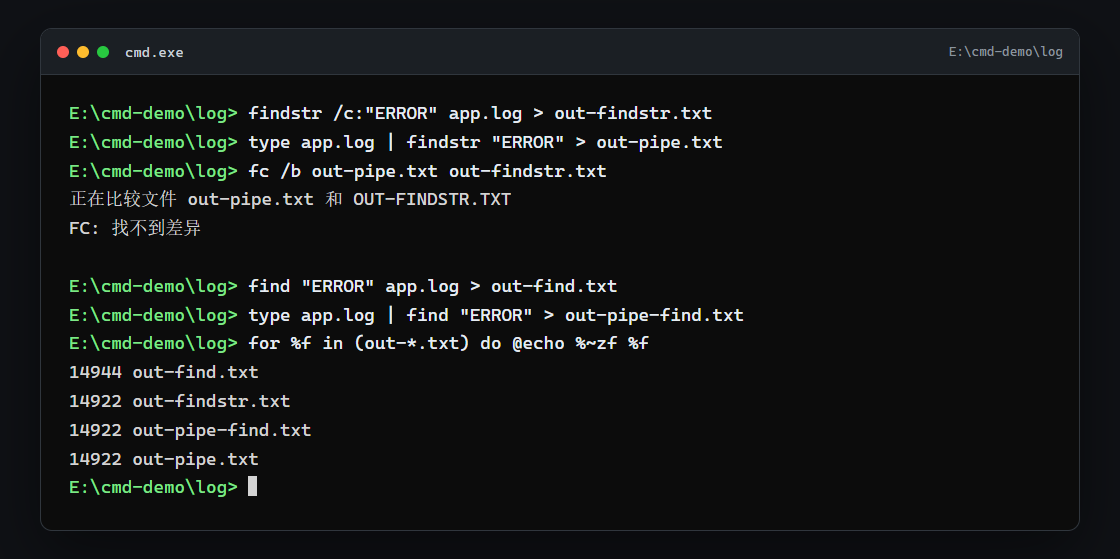
findstr /c:"ERROR" app.log > out-findstr.txt
type app.log | findstr "ERROR" > out-pipe.txt
fc /b out-pipe.txt out-findstr.txt
输出:
正在比较文件 out-pipe.txt 和 OUT-FINDSTR.TXT
FC: 找不到差异
对 findstr 来说,两种写法的输出逐字节相同,区别只在速度:多了一层 type,261 ms 对 67 ms。
find 就不一样了。走管道时它不知道文件名,标题行也就不打了:
find "ERROR" app.log > out-find.txt
type app.log | find "ERROR" > out-pipe-find.txt
for %f in (out-*.txt) do @echo %~zf %f
输出:
14944 out-find.txt
14922 out-findstr.txt
14922 out-pipe-find.txt
14922 out-pipe.txt
out-find.txt 比 out-pipe-find.txt 多 22 字节,多的就是标题行。所以脚本里要解析输出时,给文件名比走管道更稳:少了标题,也快一点。
多个文件时反过来,findstr 会给每行加上文件名前缀;管道只有一份输入,没有前缀可加。
七、编码:三种日志,两个代码页
sample.log 和 app.log 是纯 ASCII,怎么搜都正常。中文就麻烦了。先按默认代码页 936 搜 UTF-8 文件:
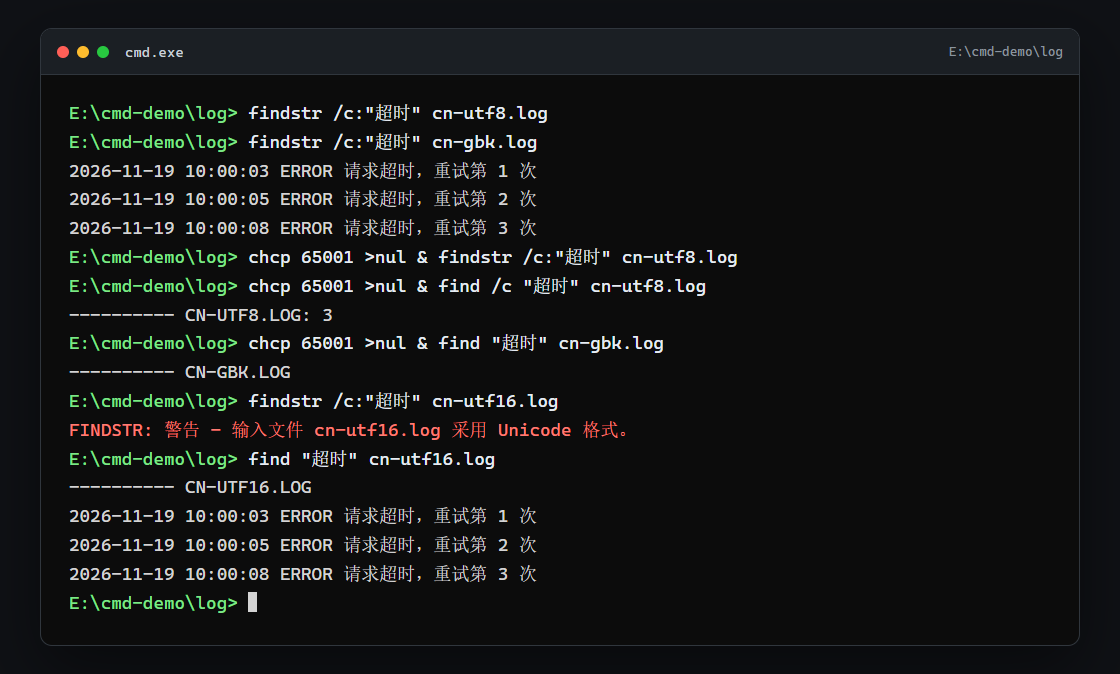
findstr /c:"超时" cn-utf8.log
没有输出,退出码 1。文件确实是 UTF-8 的「超时」,但 findstr 把搜索词按系统 ANSI 代码页(这里是 936)转成 GBK 字节,再去文件里找 GBK 字节,自然对不上。
同一个词搜 GBK 文件就正常:
findstr /c:"超时" cn-gbk.log
输出:
2026-11-19 10:00:03 ERROR 请求超时,重试第 1 次
2026-11-19 10:00:05 ERROR 请求超时,重试第 2 次
2026-11-19 10:00:08 ERROR 请求超时,重试第 3 次
改成 65001 再试一次,findstr 依然搜不到 UTF-8:
chcp 65001 >nul & findstr /c:"超时" cn-utf8.log
没有输出,退出码 1。chcp 改的是控制台代码页,findstr 的搜索词不跟着变。所以网上"中文搜不到就 chcp 65001"这句话,对 findstr 不成立。
find 才跟 chcp 走。默认 936 下它搜不到 UTF-8:
find "超时" cn-utf8.log
输出:
---------- CN-UTF8.LOG
只有标题,退出码 1。切到 65001:
chcp 65001 >nul & find /c "超时" cn-utf8.log
输出:
---------- CN-UTF8.LOG: 3
能搜到了。但同一个 65001 窗口里,GBK 文件又搜不到了:
chcp 65001 >nul & find "超时" cn-gbk.log
输出:
---------- CN-GBK.LOG
退出码 1。find 是按"当前控制台代码页"去解释搜索词和文件的,切来切去只是换了一边能命中。
UTF-16 是另一套情况。findstr 直接拒绝:
findstr /c:"超时" cn-utf16.log
输出:
FINDSTR: 警告 - 输入文件 cn-utf16.log 采用 Unicode 格式。
退出码 1。find 反而能读,因为它会看 BOM:
find "超时" cn-utf16.log
输出:
---------- CN-UTF16.LOG
2026-11-19 10:00:03 ERROR 请求超时,重试第 1 次
2026-11-19 10:00:05 ERROR 请求超时,重试第 2 次
2026-11-19 10:00:08 ERROR 请求超时,重试第 3 次
汇总一下:
| 文件 | 默认 936 | chcp 65001 后 |
|---|---|---|
cn-gbk.log + findstr |
命中 | 命中(不受 chcp 影响) |
cn-utf8.log + findstr |
不命中 | 不命中 |
cn-utf8.log + find |
不命中 | 命中 |
cn-gbk.log + find |
命中 | 不命中 |
cn-utf16.log + findstr |
警告,退出码 1 | 警告,退出码 1 |
cn-utf16.log + find |
命中 | 命中 |
纯 ASCII 的关键词在 UTF-8 文件里能搜到,因为 ASCII 字节两种编码一致;坏掉的只是中文。
八、速查表
| 需求 | 写法 | 备注 |
|---|---|---|
| 看命中行 | findstr /i /n "error" app.log |
行号格式 3: |
| 搜完整短语 | findstr /c:"request timeout" app.log |
空格不拆词 |
| 多个词任一命中 | findstr "ERROR WARN" app.log |
空格是"或" |
| 从文件读关键词 | findstr /g:keywords.txt app.log |
一行一个词 |
| 只要计数 | find /c "ERROR" app.log |
findstr 得接 find /c /v "" |
| 统计总行数 | find /c /v "" app.log |
空串配 /v |
| 反向筛选 | findstr /v "INFO" app.log |
find /v 同义 |
| 只看哪些文件命中 | findstr /m "ERROR" *.log |
find 没有 |
| 关掉正则 | findstr /l "ERR.*timeout" app.log |
默认就是正则 |
| 正则里带空格 | findstr /r /c:"^2026-11-19" app.log |
不包 /c 会被拆词 |
| 判断有没有命中 | findstr /c:"关键词" 日志 >nul |
未命中 1;文件不存在也是 1,报错文案不同 |
下一篇
筛出来的行怎么留下来、怎么接着处理,是下一篇要解决的问题:> 和 >> 差在哪、覆盖错了还能不能救、2> 和 2>&1 为什么顺序不能反、| 和 more、sort、clip 怎么把结果串成一条流水线。